S u r f - i T
TM
- 3D Modeling Kit.
Supports the latest versions of 3ds max and Autodesk VIZ
Order Securely Online
Surf-iT™
is a Powerful Easy-To-Use 3D Modeling System
for 3dsmax™, Design™, 3D Studio™, and Autodesk VIZ™.
|
|
Surf-iT Testimonials:
Read what 3D experts say about Surf-iT
[more...]
My full appreciation for Surf-iT was realized when I had to create several 3D models for a design my group is doing. I had to create these objects rapidly under a tight schedule, but at the same time they had to be extremely high quality models. Well, I'm proud to say that Surf-iT delivered the goods and more! What an awesome tool! Thank you!" - Rom Impas, Product Designer MICROSOFT CORP.
Surf-iT's main feature components
[more...]
Surf-iT Enhancements
[more...]
Additional Surf-iT Highlights
[more...]
Why should you use Surf-iT?
[more...]
Read more about Surf-iT in CGI magazine's review!
[more...]
|
|
|
PRODUCT INFORMATION
|
|
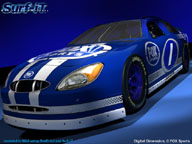
Surf-iT a full-featured robust 3D modeling package for 3ds max and Autodesk VIZ, which provides unprecedented speed and quality in Spline construciton, editing and surfacing. It's a more ideal starting point for all of your 3D modeling projects, because not only can you do more accurate 3D design work with Splines, but you can easily convert to organized efficient quad-patches, NURBS and even Editable Poly objects for polygon modeling - integrating Surf-iT and all your favorite host tools in the same modeling pipeline!
Check out a few User Testimonials to see what 3D modelers, designers, animators, and other experts are saying about Surf-iT...
Surf-iT is comprised of several modular and parametric creation and modification components. The purpose of the Surf-iT modeling kit is to provide fast and diverse 3D modeling using parametric Spline and surface construction tools. The unique tools, processes, and technology used in the core engine of Surf-iT empower the end-user with a wealth of options for surfacing Surf-iT S-Objects and Splines (the primary framework for the Surf-iT modleing workflow). Surfacing Splines with Surf-iT currently provides the highest quality, efficiency and optimization available in making quad patches. Using your 3D modeling knowledge of drawing and editing Splines in 3D space, you can quickly and easily create stunning organic 3D models or precise design curves that can be copied and trasnformed to other areas of the model easily.
Anyone can benefit from the advantages of this easy-to-learn Spline modeling work flow! Surf-iT breaks new ground in parametric Spline creation, editing and surfacing capabilities. If you are new to 3D coming from a 2D background, you'll love Surf-iT's simple workflow. However, if you are a power user who really wants to crank out advanced 3D forms quickly, you'll appreciate the powerfully editable S-Objects. Surf-iT is the premiere 3ds max and Autodesk VIZ solution to incorporate instant creation of parametric 3D Spline objects, and each revision builds on these new Spline object creation tools. Additionally, there are five other modular components making Surf-iT extremely powerful and fully compatible with the standard tools and environment of 3ds max and Autodesk. You can use Surf-iT’s robust Spline Editor to locally (or globally) refine and shape the areas of the object where you need more detail. Instantly extrude cavities or protrusions - at the Spline level! This gives you maximum flexibility, as you’ll never need to commit to "critical" surface decisions again. Instead, surfacing is automatic, multi-level, and can be viewed simultaneously during Spline operations.
Surf-iT uniquely optimizes the surface for a desirable construction and efficient polygon count, while automatically detecting and highlighting any Spline anomalies. Combine this intelligent surfacing with speed, MAXScript-ability, a Macro suite, extensive documentation and tutorials, and it is obvious why Surf-iT is being used as an essential toolbox by so many professional 3D modelers, designers, animators, and experts around the world!
|
|
|
|
• Surf-iT S-Objects...
Powerful 3D object creation tools:
- These are dynamic parametric advanced vector accurate 3D Spline objects that allow you to easily construct ideal Spline geometry for both CAD and Organic modeling projects. S-Objects, can be instantly surfaced or easily modified with Surf-iT's Spline editing and modeling tools. S-Objects are the perfect platform to ensure rapid creation of precise, sophisticated, efficient, re-purposeable, 3D models of any shape, form and 3D geometry/data type...
• Segment-iT modifier:
- Three blazingly fast, powerful methods refining, dividing, or segmenting individual Spline selections or entire Splines objects in various ways.
• Connect-iT modifier:
- Includes automatic connection of ordered splines; with connecting knot type options; u-splines subdivisions of connecting splines, source-spline subdivisions, sub-object spline reordering list; generate splines toggle to turn off connecting splines (adds greater flexibility when combined with other features and the Spline Editor).
• Surf-iT Patch modifier:
- Creates patch-based surfaces using GHOST 3D's unique algorithm to surface Spline
objects flawlessly and even solid-object Spline configurations using Ambiguous Quad. solvers, EQA Handling. Removes redundant or unwanted patches, and also
solves internally for face normals consistency and various anomalies. This algorithm can surface up to several times faster than the similar Surface Tools result); includes
display, steps, updating, and other options and parameters; includes anomaly detection (sub-object mode) that filters and selects anomalies with source object and surface creation (we are open to adding more filters as necessary).
• Surf-iT Mesh modifier:
- Creates mesh surfaces using the same algorithms in the Surf-iT Patch engine, and even faster because the output is mesh geometry only. This surfacing engine is perfect for low poly game modeling in combination with the enormously phat set of Spline Editor tools that leverage the ease of poly building and the flexibility of Splines.
After which the object can be tesselated and/or interpolated with smooth Patches using Surf-iT Patch, or the Surf-iT Mesh output can be further tweaked and subdivided using HSDS subdivision surfaces.
You can even subdivide local areas of the implied surface prior to a Surf-iT Mesh surface, by using parametric Spline Editing such as Extrude Segs, CloneConnect, or Connect-iT's U-spline and source Spline subdivision features, or other parameters.
in the Surf-iT parametric 3D Spline object.
• Spline Editor:
- Custom Spline Editor including advanced spline operations in addition to essential
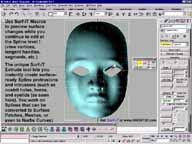
standard Edit Spline features. It's Spline Editing completely overhauled! This modifier has a floating toolbar, macro previewing of surface (while manipulating vertices and bezier tangents), fixed show end results (toggle-able), intelligent selections, max-scriptability, user-definable Operations rollout, and that's just the beginning...
- Key Spline Editor features are:
Join Segs (segments) for easy comprehensive definition of splines,
and improved vector editing; Extrusion, Connection, and filling features;
Select All in Spline, Radial Selection and many other convenient and intelligent selection tools; an automatic multi-Snap (vertices) feature for joining clusters in character modeling and mirrored halves in symmetry modeling; floating toolbar; quads; robust scripting, and too much more too list...
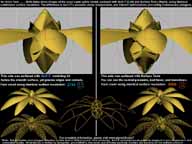
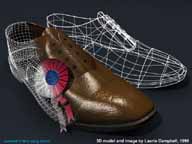
... 3D Modelers, experts, Gurus... We can't say it enough... The Surf-iT work flow offers easier more powerful trouble free tools to build Detail-Independent animatable Patch and Polygon models from Splines, leveraging precise curve to surface creation, faster modification, details and redesign, better Polygon construction, the ability to subdivide local areas and global regions, and advanced selection and manipulation of model features that are not possible using standard tools that operate on polygons directly. S-Objects allow you to create sophisticated Spline geometry fast, and the Spline Editor offers unprecedented modifications and editing, while Surf-iT's surfacing components instantly transform your work into subdivision Patches, Optimal Polygon models of any L.O.D., NURBS, or even low-poly for HSDS use or editing with other Polygon tools. Surf-iT is the ideal platform for any project!
|
|
Surf-iT provides an indispensible set of 3D modeling and design tools to enhance any 3D modeling project!
Check out the Surf-iT feature enhancements and Additional Surf-iT Highlights sections to learn more about Surf-iT's many unique features and tools.
Surf-iT has been developed to meet the rigorous demands of product design, modeling for manufacturing, clothing/fashion, arhitecture, and even being used in proprietary game engine technology. In Film and Video production environments extensive comparisons have been performed proving Surf-iT's superior patch and mesh surfacing speed and quality. Surf-iT is very forgiving with varying and complex user defined spline objects. Depending on the spline geometry construction, Surf-iT's internal patch optimizations can yield up to 50% less polygons than other surface or surface engines -but without any surface degradation! Surf-iT Patch surfacing ranges between 200% and 800% faster than other surfacing technologies (like NURBS, T-Splines, and other surface tools) when calculating the same surface detail and source data. Surf-iT mesh surfacing is even several times faster than that. In fact, Surf-iT is such a workhorse for surfacing large spline datasets that it is included in the Scribe-iT MicroScribe software for 3ds max. It's also great for designing and re-designing accurate product data, or animated regeneration of complex models, characters, or simulations. This makes Surf-iT an obvious choice of 3D professionals around the world, including 3D modelers, simulation engineers, geological surveyors, landscape engineers, product designers, game developers, TV and Film graphics professionals, and many others...
Need to model complex surfaces, precise mechanical parts, expansive landscapes and terrain, develop intricate creatures with branching arms, legs, fingers, detailed, wrinkles and cavities? Forget NURBS hassles, polygon-vertigo, metaball inaccuracy, and technological limitations...Simply create instant S-Spline objects, easily perform advanced modifications and edits, and regenerate surfaces automatically...
...it's easy to create, manipulate and animate...with Surf-iT!
|
The new release of Surf-iT has been updated and enhanced in several ways. Additionally, Surf-iT is fully integrated with the latest versions of 3ds max, Design, and Autodesk VIZ. Surf-iT also supports previous versions of 3ds max, Design, Autodesk VIZ, and 3D Studio.
Here are some key highlights and enhancements:
• Surf-iT's Spline Editor enhancements:
- A default set of Spline Editor macro functions are automatically loaded and allow context sensitive and some context independent control over just about every Spline Editor command operation.
- Added Spline Editor enhancements to improve productivity and performance. Reduced clicks and work flow optimizations save you time and offer easier more useful Spline Editing features and Spline to Patch/Mesh surfacing capabilities that ensure Surf-iT Patch and Mesh will smartly and efficiently interpret your Spline model.
- More Spline Editor support Soft Selection and Vertex Selections by Segment.
- Surf-iT has unique spline Extrusion and Connection features that provide the versatility of creating and adapting an implied surface. True extrusion along implied surface normals can extrude interior and perimeter shape selections and has been enhanced to make use of the Connecting Knot Type option.
- The Connect-iT tools in the Spline Editor are enhanced and include some of the more advanced features found in the Connect-iT modifier, including U-Splines.
- Spline Editor mini Toolbar enhancements to Vertex Type buttons and "Put Selection To" and "Add Selection To" options for switching selections between sub-object modes.
- New UI enhancements have been added to the whole max UI and Surf-iT toolbar, through the use of major Spline Editor scripting enhancements. There are specialized custom controls for the Spline Editor and Menu items to access most of the major plugin components. You can customize all of the major functions through the Customize User Interface dialog by choosing the Surf_iT or Surf-iT Spline Editor category from the Category pull down menu in either the 'Keyboard', 'Toolbars', 'Quads', or 'Menus' tabs. It is also recommend to save your Custom UI scheme and load the Surf-iT UI scheme to see some of the available tool buttons and menus.
• Updated Surf-iT Macros and Scriptable UI:
- Enhanced UI menus and scriptable menu features.
- Script support for EQA Handling in Surf-iT Ref Preview floater.
- Surf-iT Ref Preview floating UI is scripted entirely with Surf-iT's scriptable features, and can be used to create, manage, edit/re-parameterize, and visualize surfaces, polygons, points, and Anomaly Detections while working with Splines, Spline features, and Spline controls to shape the model.
- Spline Editor Quad menus are installed automatically and will persist to be merged with whatever UI you load. The Quad menus are fully accessible when you right click on a Spline object that has a selected Spline Editor modifier added to its modifier stack. These right-click Quad menus are organized mainly by Sub-Object level (Vertex, Segment, Spline) and by Creation tools and Selection tools. They contain customized implementations of the Spline Editor command operations and functional methods through the Surf-iT_SplineEditor.mcr functions - designed for even faster access to
each tool, and to provide extended scripted tools.
- Enhanced Surf-iT Spline Editor Extrude Segments feature now supports open segment selections in addition to the closed segment selections.
- This Extrude tool is very unique and powerful for making surface protrusions and intrusions such as surfaced holes by allowing you to select interior segments for extrusions as a separate but simultaneous selection set for copying or moving the interior segments while extruding all in one action. Refer to the Spline Editor section for more information.
• Surf-iT's S-Objects™ incorporate Rendering & Interpolation control.
- S-Objects controls include renderability of Splines and mesh surface separately in viewports and final renders.
Many other Surf-iT features have also been updated for performance and quicker work flow.
- Extensive Quality Assurance and beta testing helps ensure the performance and stability of this product. There are no known performance issues at this time. However, if you find a problem that is reproducible using Surf-iT only without other third party tools or plug-ins, please report it to our Support team, as we update Surf-iT regularly.
Note: unauthorized versions of this product are not supported and will not reflect the features, performance or stability of the commercial product.
|
Below is a list of some additional Surf-iT feature highlights:
- Surf-iT Patch and Surf-iT Mesh Parameters incorporate an optional process called Auto EQA Handling. This new proprietary technology (patent pending) enables the accurate and efficient surfacing of extremely complex and dense adjacencies of quadrangular shapes in the Spline model.
• Powerful Connect-iT ™ Spline-Surface constructions tools incorporated within the Spline Editor UI.
- Connect-iT is a parametric modifier, AND is also incorporated into the Spline Editor panels.
- Additional connecting and bridging tools have been incorporated, which include individual connections, and automatic Spline cage tools and Spline lattice generation that interpolate Spline shapes, curvature, and vectors in U,V, and W directions.
- Enhanced Extrude tool in Spline Editor modifier makes it easy to create protrusions and intrusions into a complex Spline model.
• Optimized animation updates for animated and non-animated Surf-iT Patch objects.
- Independent animation control in Track View controllers for Surf-iT Patch surface Rendered L.O.D. (Level Of Detail) and Viewport L.O.D.
• Dynamic S-Objects™ creation tools:
- S-BoxSphere object:
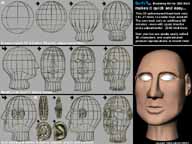
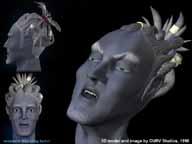
- This S-Object creation tool is great for starting most 3D model projects, providing a wide ariety of construction and smoothing control. S-BoxSphere has dynamic parameters allowing you to customize the quantity of Splines and layout. It is exceptionally well suited for creating powerfully editable character heads and other smooth round shapes. S-BoxSphere can also be used to create easily modifiable perfect spheres, hemispheres, or other spherical forms without any polygonal artifacts, tension problems or other seams or creases.
- S-Lathe object:
- This S-Object creation tool is not only tremendously powerful it's amazing fun, especially when used with all of it's instancing parameters. Draw one curve in seconds, and you instantly have a 'unique' sophisticated voluminous 3-Dimensional model. The S-Lathe is suited toward making all sorts of complex Spline lattices, including humanoid and animal bodies, torsos, and many other CAD accurate powerfully editable lathed objects like bottles, vases, architectural columns, and more...
- Surf-iT incorporates powerfully integrated scripting for applying and parametrizing modules and to invoike most tools. All the Surf-iT methods, scripting functions, interface and properties are available to the end user, including get functions for essential toggle controls like Radial Selection, Soft Selection, Select All in Spline, and more. All command modes can be accessed via their respective methods, and there are high level macro functions also. Advanced scripters will enjoy working with scripting on the Modifier stack interface as well as the robust access to Surf-iT's module parameters and Spline editing tools.
- Useful preset macro functions are provided for Surf-iT modules and most features. Macros can also be recorded or scripted by the user.
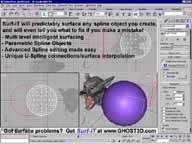
- Additionally, Surf-iT includes the powerful Surf-iT SRP Controls, which includes a floating toolbar Command Center that allows extensive control over creation and parameters of Surf-iT Reference Preview objects (SRPs) for visualization while modeling, or for final outputs.
|
|